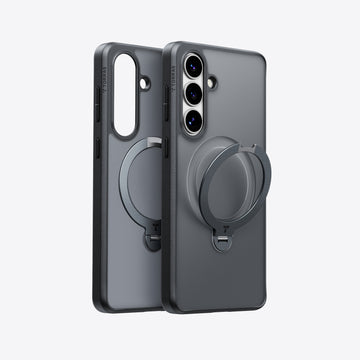
You remember the day you slid your brand-new Samsung S26 Plus into its crystal-clear cover—the phone’s sleek design visible through a flawless transparent shell. Fast forward a few months, and that once-pristine cover has taken on an unmistakable yellowish tinge that no amount of wiping seems to fix. It’s a frustrating reality that countless Samsung S26 Plus owners face, and it goes beyond mere aesthetics. That yellow discoloration actually signals that the material itself is breaking down at a molecular level, compromising both the look and the protective integrity of your cover. So why does this happen to a device that commands such a premium presence? What triggers this unsightly transformation, and more importantly, can you actually prevent it? This guide dives deep into the science behind yellowing, explores the environmental and chemical factors at play, and delivers practical, proven strategies to keep your Samsung S26 Plus looking as sharp as the day you unboxed it. From material selection to maintenance routines, you’ll walk away with everything you need to fight back against the yellow.
The Science Behind the Stain: Why Your Samsung S26 Plus Cover Yellows
The yellowing of your Samsung S26 Plus cover isn’t random bad luck—it’s chemistry in action. The primary villain is ultraviolet light, which triggers a process called photo-oxidation. When UV rays penetrate the molecular structure of your cover’s material, they break apart the polymer chains that give it clarity and flexibility. This degradation produces chromophores—molecular groups that absorb visible light and reflect back that telltale yellow hue. Even indoor lighting, particularly fluorescent bulbs, emits enough UV radiation to gradually initiate this breakdown over weeks and months.
Most transparent Samsung S26 Plus covers are manufactured from TPU (thermoplastic polyurethane), a material prized for its flexibility, shock absorption, and initial crystal clarity. However, TPU is inherently vulnerable to oxidative degradation. When exposed to oxygen in the air—especially in combination with heat—the aromatic compounds within TPU undergo chemical reactions that darken the material progressively. Air pollutants like ozone and nitrogen dioxide accelerate this process significantly, meaning urban environments can speed up yellowing compared to cleaner air settings.
Manufacturing additives compound the problem. Many covers contain flame retardants, plasticizers, and UV stabilizers that paradoxically degrade over time, releasing byproducts that contribute to discoloration. The cheaper the cover, the more likely it relies on lower-grade stabilizers that exhaust their protective capacity within weeks rather than months. Beyond environmental factors, your own body chemistry plays a role. Natural skin oils, sweat containing salts and acids, and residue from lotions or hand sanitizers seep into the micro-pores of TPU, creating a grimy layer that bonds with the degrading polymer and deepens the yellow appearance. Harsh cleaning agents—bleach-based wipes or acetone—strip away protective coatings and accelerate material breakdown rather than reversing it. By contrast, materials like polycarbonate and high-grade silicone resist yellowing far more effectively due to their more stable molecular bonds and resistance to UV penetration, though they sacrifice some of the flexible, slim-profile feel that makes TPU so popular. Brands like TORRAS have addressed this by engineering cases with advanced anti yellowing Samsung S26 Plus cover formulations that extend clarity far beyond what standard TPU covers achieve.
Your First Line of Defense: Choosing an Anti-Yellowing Screen Protector
Understanding why your Samsung S26 Plus cover yellows is only half the battle—now it’s time to act. While most owners focus exclusively on their case, the screen protector you choose plays a surprisingly important role in the overall discoloration equation. A quality screen protector doesn’t just shield your display from scratches; it actively reduces the buildup of oils and contaminants that migrate to your cover’s edges and interior surface, accelerating that yellow transformation. Selecting the right protective accessory becomes your first strategic move in keeping the entire phone looking fresh.
Material Matters: Tempered Glass vs. Hybrid Films
Tempered glass screen protectors hold a decisive advantage over plastic hybrid films when it comes to resisting yellowing. Glass is an inorganic material—its molecular structure simply doesn’t undergo the photo-oxidation that plagues polymer-based films. A tempered glass protector maintains its optical clarity indefinitely, never developing that hazy amber tint that cheaper PET or TPU films exhibit after prolonged UV exposure. Beyond yellowing resistance, tempered glass delivers a surface hardness typically rated at 9H, meaning it shrugs off keys, coins, and everyday abrasion that would scar a plastic film within weeks. For Samsung S26 Plus owners who demand both visual perfection and lasting durability, tempered glass is the clear winner. The tactile experience also mirrors the feel of bare glass, maintaining the smooth swipe responsiveness that hybrid films can sometimes diminish with their softer, tackier surfaces.
The Coating is Key: Hydrophobic and Oleophobic Properties
Not all tempered glass protectors are created equal—the coatings applied to their surface determine how well they repel the very substances that contribute to cover yellowing. A hydrophobic coating causes water and liquid-based contaminants to bead up and roll off rather than spreading across the surface and seeping toward case edges. An oleophobic coating does the same for oils, creating an invisible barrier that prevents fingerprint residue and skin secretions from accumulating on your device. This matters because those oils don’t stay confined to the screen. Every time you slide your Samsung S26 Plus into its cover or grip the phone, oils transfer to the case interior and edges, bonding with the TPU material and feeding the discoloration process. A screen protector with robust oleophobic treatment dramatically reduces this oil migration, keeping your fingers’ natural secretions from becoming fuel for yellowing. When shopping for a protector, look for products from reputable accessory manufacturers like TORRAS that specifically advertise multi-layer AF (anti-fingerprint) coating rather than basic single-layer treatments, as these maintain their repellent properties far longer under daily use conditions.
Step-by-Step Guide: Applying and Maintaining Your Protective Gear
Knowing which protector to buy is one thing—installing it correctly and maintaining your entire protective setup is what separates Samsung S26 Plus owners who enjoy lasting clarity from those watching their accessories degrade prematurely. A perfectly applied screen protector eliminates trapped contaminants that can migrate to your cover, while a consistent maintenance routine neutralizes the oils and environmental residues that feed the yellowing process.
Pre-Installation: Creating the Perfect Clean Environment
Dust particles are the enemy of a flawless application—even a single speck trapped beneath your tempered glass creates a permanent blemish and a potential lifting point where contaminants enter. Choose a small, enclosed room and run a hot shower for five minutes beforehand; the steam pulls airborne dust to the floor and surfaces, leaving you with remarkably clean air to work in. Set up on a freshly wiped countertop with your microfiber cloth, alcohol prep pad, dust-removal stickers, and the screen protector kit laid out within arm’s reach. Good overhead lighting is essential so you can spot any remaining particles on your Samsung S26 Plus display before committing to the application.
The Flawless Application Process for Your Tempered Glass
Start by powering off your Samsung S26 Plus and removing the existing cover entirely—you need unobstructed access to the screen edges. Wipe the display thoroughly with the alcohol prep pad, moving in one direction from top to bottom rather than circular motions that redistribute residue. Follow immediately with the dry microfiber cloth to eliminate any moisture streaks. Inspect the screen under direct light at multiple angles, using dust-removal stickers to lift any stubborn particles you spot. Now peel back the adhesive side of the tempered glass protector halfway, holding it by the edges only. Align the top edge with the speaker cutout and earpiece of the S26 Plus—this is your anchor point. Once the top edge sits perfectly flush, slowly lower the remaining protector down toward the bottom, allowing the adhesive to make contact gradually. Gravity and the adhesive layer will naturally push air outward if you maintain a steady, unhurried descent. If a small bubble appears, don’t panic—use the included squeegee card to gently push it toward the nearest edge with firm, even pressure. Avoid lifting and reapplying, as this introduces new dust and weakens the adhesive bond.
Long-Term Care to Prevent Yellowing and Damage
Establish a weekly cleaning ritual using a solution of 70% isopropyl alcohol and 30% distilled water applied to a microfiber cloth—never spray directly onto the phone or cover. Gently wipe both the screen protector surface and the interior of your Samsung S26 Plus cover, paying attention to the edges where oil accumulation is heaviest. Avoid bleach, acetone, window cleaners, or any ammonia-based products, as these strip protective coatings and accelerate polymer breakdown. When you’re not using your phone for extended periods, store it face-down away from windowsills and direct sunlight—even thirty minutes of intense UV exposure daily compounds into significant yellowing over a few months. Consider rotating between two covers if possible, allowing each one time to air out and reducing continuous contact with skin oils. These small habits collectively extend the life and clarity of your protective accessories far beyond what passive use allows.
Keep Your Samsung S26 Plus Cover Crystal Clear with the Right Strategy
The yellowing of your Samsung S26 Plus cover isn’t a mystery—it’s a predictable chemical process driven by UV light exposure, oxidative degradation from air pollutants, and the steady accumulation of skin oils and environmental contaminants on vulnerable TPU materials. Now that you understand the enemy, you can fight it with a clear two-part strategy. First, invest in a high-quality tempered glass screen protector equipped with robust hydrophobic and oleophobic coatings. This single choice eliminates one of the largest sources of oil migration to your cover while ensuring your display remains crystal clear indefinitely. Second, commit to proper installation techniques and a gentle, consistent maintenance routine—weekly cleaning with diluted isopropyl alcohol, mindful storage away from direct sunlight, and avoiding harsh chemicals that strip protective layers rather than preserving them. Protecting your Samsung S26 Plus isn’t a one-time decision; it’s an ongoing practice that rewards you with a device that looks and feels premium month after month. Armed with this knowledge, you have every tool you need to keep that yellowing at bay and let your phone’s design shine through exactly as intended. The choice is yours—take action today.
HTML
<header>
<div class=”st-emotion-cache-pgf13w e1nzilvr3″ data-testid=”stHeadingWithActionElements”>
<h1 id=”why-samsung-s26-plus-covers-yellow-and-how-to-stop-it”>Why Samsung S26 Plus Covers Yellow and How to Stop It</h1>
</div>
</header>
<section class=”introduction”>
<p>You remember the day you slid your brand-new Samsung S26 Plus into its crystal-clear cover—the phone’s sleek design visible through a flawless transparent shell. Fast forward a few months, and that once-pristine cover has taken on an unmistakable yellowish tinge that no amount of wiping seems to fix. It’s a frustrating reality that countless Samsung S26 Plus owners face, and it goes beyond mere aesthetics. That yellow discoloration actually signals that the material itself is breaking down at a molecular level, compromising both the look and the protective integrity of your cover. So why does this happen to a device that commands such a premium presence? What triggers this unsightly transformation, and more importantly, can you actually prevent it? This guide dives deep into the science behind yellowing, explores the environmental and chemical factors at play, and delivers practical, proven strategies to keep your Samsung S26 Plus looking as sharp as the day you unboxed it. From material selection to maintenance routines, you’ll walk away with everything you need to fight back against the yellow.</p>
</section>
<section class=”main-content”>
<div class=”st-emotion-cache-pgf13w e1nzilvr3″ data-testid=”stHeadingWithActionElements”>
<h2 id=”the-science-behind-the-stain-why-your-samsung-s26-plus-cover-yellows”>The Science Behind the Stain: Why Your Samsung S26 Plus Cover Yellows</h2>
</div>
<p>The yellowing of your Samsung S26 Plus cover isn’t random bad luck—it’s chemistry in action. The primary villain is ultraviolet light, which triggers a process called photo-oxidation. When UV rays penetrate the molecular structure of your cover’s material, they break apart the polymer chains that give it clarity and flexibility. This degradation produces chromophores—molecular groups that absorb visible light and reflect back that telltale yellow hue. Even indoor lighting, particularly fluorescent bulbs, emits enough UV radiation to gradually initiate this breakdown over weeks and months.</p>
<img src=”https://torraslife.com/cdn/shop/files/20260312-151255.jpg?v=1773299627&width=360″ alt=”anti yellowing samsung s26 plus cover”>
<p>Most transparent Samsung S26 Plus covers are manufactured from TPU (thermoplastic polyurethane), a material prized for its flexibility, shock absorption, and initial crystal clarity. However, TPU is inherently vulnerable to oxidative degradation. When exposed to oxygen in the air—especially in combination with heat—the aromatic compounds within TPU undergo chemical reactions that darken the material progressively. Air pollutants like ozone and nitrogen dioxide accelerate this process significantly, meaning urban environments can speed up yellowing compared to cleaner air settings.</p>
<p>Manufacturing additives compound the problem. Many covers contain flame retardants, plasticizers, and UV stabilizers that paradoxically degrade over time, releasing byproducts that contribute to discoloration. The cheaper the cover, the more likely it relies on lower-grade stabilizers that exhaust their protective capacity within weeks rather than months. Beyond environmental factors, your own body chemistry plays a role. Natural skin oils, sweat containing salts and acids, and residue from lotions or hand sanitizers seep into the micro-pores of TPU, creating a grimy layer that bonds with the degrading polymer and deepens the yellow appearance. Harsh cleaning agents—bleach-based wipes or acetone—strip away protective coatings and accelerate material breakdown rather than reversing it. By contrast, materials like polycarbonate and high-grade silicone resist yellowing far more effectively due to their more stable molecular bonds and resistance to UV penetration, though they sacrifice some of the flexible, slim-profile feel that makes TPU so popular. Brands like TORRAS have addressed this by engineering cases with advanced <a href=”https://torraslife.com/collections/samsung-s26-plus” target=”_blank” rel=”noopener noreferrer”>anti yellowing Samsung S26 Plus cover</a> formulations that extend clarity far beyond what standard TPU covers achieve.</p>
<div class=”st-emotion-cache-pgf13w e1nzilvr3″ data-testid=”stHeadingWithActionElements”>
<h2 id=”your-first-line-of-defense-choosing-an-anti-yellowing-screen-protector”>Your First Line of Defense: Choosing an Anti-Yellowing Screen Protector</h2>
</div>
<p>Understanding why your Samsung S26 Plus cover yellows is only half the battle—now it’s time to act. While most owners focus exclusively on their case, the screen protector you choose plays a surprisingly important role in the overall discoloration equation. A quality screen protector doesn’t just shield your display from scratches; it actively reduces the buildup of oils and contaminants that migrate to your cover’s edges and interior surface, accelerating that yellow transformation. Selecting the right protective accessory becomes your first strategic move in keeping the entire phone looking fresh.</p>
<div class=”st-emotion-cache-pgf13w e1nzilvr3″ data-testid=”stHeadingWithActionElements”>
<h3 id=”material-matters-tempered-glass-vs-hybrid-films”>Material Matters: Tempered Glass vs. Hybrid Films</h3>
</div>
<p>Tempered glass screen protectors hold a decisive advantage over plastic hybrid films when it comes to resisting yellowing. Glass is an inorganic material—its molecular structure simply doesn’t undergo the photo-oxidation that plagues polymer-based films. A tempered glass protector maintains its optical clarity indefinitely, never developing that hazy amber tint that cheaper PET or TPU films exhibit after prolonged UV exposure. Beyond yellowing resistance, tempered glass delivers a surface hardness typically rated at 9H, meaning it shrugs off keys, coins, and everyday abrasion that would scar a plastic film within weeks. For Samsung S26 Plus owners who demand both visual perfection and lasting durability, tempered glass is the clear winner. The tactile experience also mirrors the feel of bare glass, maintaining the smooth swipe responsiveness that hybrid films can sometimes diminish with their softer, tackier surfaces.</p>
<div class=”st-emotion-cache-pgf13w e1nzilvr3″ data-testid=”stHeadingWithActionElements”>
<h3 id=”the-coating-is-key-hydrophobic-and-oleophobic-properties”>The Coating is Key: Hydrophobic and Oleophobic Properties</h3>
</div>
<p>Not all tempered glass protectors are created equal—the coatings applied to their surface determine how well they repel the very substances that contribute to cover yellowing. A hydrophobic coating causes water and liquid-based contaminants to bead up and roll off rather than spreading across the surface and seeping toward case edges. An oleophobic coating does the same for oils, creating an invisible barrier that prevents fingerprint residue and skin secretions from accumulating on your device. This matters because those oils don’t stay confined to the screen. Every time you slide your Samsung S26 Plus into its cover or grip the phone, oils transfer to the case interior and edges, bonding with the TPU material and feeding the discoloration process. A screen protector with robust oleophobic treatment dramatically reduces this oil migration, keeping your fingers’ natural secretions from becoming fuel for yellowing. When shopping for a protector, look for products from reputable accessory manufacturers like TORRAS that specifically advertise multi-layer AF (anti-fingerprint) coating rather than basic single-layer treatments, as these maintain their repellent properties far longer under daily use conditions.</p>
<div class=”st-emotion-cache-pgf13w e1nzilvr3″ data-testid=”stHeadingWithActionElements”>
<h2 id=”step-by-step-guide-applying-and-maintaining-your-protective-gear”>Step-by-Step Guide: Applying and Maintaining Your Protective Gear</h2>
</div>
<p>Knowing which protector to buy is one thing—installing it correctly and maintaining your entire protective setup is what separates Samsung S26 Plus owners who enjoy lasting clarity from those watching their accessories degrade prematurely. A perfectly applied screen protector eliminates trapped contaminants that can migrate to your cover, while a consistent maintenance routine neutralizes the oils and environmental residues that feed the yellowing process.</p>
<div class=”st-emotion-cache-pgf13w e1nzilvr3″ data-testid=”stHeadingWithActionElements”>
<h3 id=”pre-installation-creating-the-perfect-clean-environment”>Pre-Installation: Creating the Perfect Clean Environment</h3>
</div>
<p>Dust particles are the enemy of a flawless application—even a single speck trapped beneath your tempered glass creates a permanent blemish and a potential lifting point where contaminants enter. Choose a small, enclosed room and run a hot shower for five minutes beforehand; the steam pulls airborne dust to the floor and surfaces, leaving you with remarkably clean air to work in. Set up on a freshly wiped countertop with your microfiber cloth, alcohol prep pad, dust-removal stickers, and the screen protector kit laid out within arm’s reach. Good overhead lighting is essential so you can spot any remaining particles on your Samsung S26 Plus display before committing to the application.</p>
<div class=”st-emotion-cache-pgf13w e1nzilvr3″ data-testid=”stHeadingWithActionElements”>
<h3 id=”the-flawless-application-process-for-your-tempered-glass”>The Flawless Application Process for Your Tempered Glass</h3>
</div>
<p>Start by powering off your Samsung S26 Plus and removing the existing cover entirely—you need unobstructed access to the screen edges. Wipe the display thoroughly with the alcohol prep pad, moving in one direction from top to bottom rather than circular motions that redistribute residue. Follow immediately with the dry microfiber cloth to eliminate any moisture streaks. Inspect the screen under direct light at multiple angles, using dust-removal stickers to lift any stubborn particles you spot. Now peel back the adhesive side of the tempered glass protector halfway, holding it by the edges only. Align the top edge with the speaker cutout and earpiece of the S26 Plus—this is your anchor point. Once the top edge sits perfectly flush, slowly lower the remaining protector down toward the bottom, allowing the adhesive to make contact gradually. Gravity and the adhesive layer will naturally push air outward if you maintain a steady, unhurried descent. If a small bubble appears, don’t panic—use the included squeegee card to gently push it toward the nearest edge with firm, even pressure. Avoid lifting and reapplying, as this introduces new dust and weakens the adhesive bond.</p>
<div class=”st-emotion-cache-pgf13w e1nzilvr3″ data-testid=”stHeadingWithActionElements”>
<h3 id=”long-term-care-to-prevent-yellowing-and-damage”>Long-Term Care to Prevent Yellowing and Damage</h3>
</div>
<p>Establish a weekly cleaning ritual using a solution of 70% isopropyl alcohol and 30% distilled water applied to a microfiber cloth—never spray directly onto the phone or cover. Gently wipe both the screen protector surface and the interior of your Samsung S26 Plus cover, paying attention to the edges where oil accumulation is heaviest. Avoid bleach, acetone, window cleaners, or any ammonia-based products, as these strip protective coatings and accelerate polymer breakdown. When you’re not using your phone for extended periods, store it face-down away from windowsills and direct sunlight—even thirty minutes of intense UV exposure daily compounds into significant yellowing over a few months. Consider rotating between two covers if possible, allowing each one time to air out and reducing continuous contact with skin oils. These small habits collectively extend the life and clarity of your protective accessories far beyond what passive use allows.</p>
</section>
<section class=”conclusion”>
<div class=”st-emotion-cache-pgf13w e1nzilvr3″ data-testid=”stHeadingWithActionElements”>
<h2 id=”keep-your-samsung-s26-plus-cover-crystal-clear-with-the-right-strategy”>Keep Your Samsung S26 Plus Cover Crystal Clear with the Right Strategy</h2>
</div>
<p>The yellowing of your Samsung S26 Plus cover isn’t a mystery—it’s a predictable chemical process driven by UV light exposure, oxidative degradation from air pollutants, and the steady accumulation of skin oils and environmental contaminants on vulnerable TPU materials. Now that you understand the enemy, you can fight it with a clear two-part strategy. First, invest in a high-quality tempered glass screen protector equipped with robust hydrophobic and oleophobic coatings. This single choice eliminates one of the largest sources of oil migration to your cover while ensuring your display remains crystal clear indefinitely. Second, commit to proper installation techniques and a gentle, consistent maintenance routine—weekly cleaning with diluted isopropyl alcohol, mindful storage away from direct sunlight, and avoiding harsh chemicals that strip protective layers rather than preserving them. Protecting your Samsung S26 Plus isn’t a one-time decision; it’s an ongoing practice that rewards you with a device that looks and feels premium month after month. Armed with this knowledge, you have every tool you need to keep that yellowing at bay and let your phone’s design shine through exactly as intended. The choice is yours—take action today.</p>
</section>
Buy Me A Coffee
The Havok Journal seeks to serve as a voice of the Veteran and First Responder communities through a focus on current affairs and articles of interest to the public in general, and the veteran community in particular. We strive to offer timely, current, and informative content, with the occasional piece focused on entertainment. We are continually expanding and striving to improve the readers’ experience.
© 2026 The Havok Journal
The Havok Journal welcomes re-posting of our original content as long as it is done in compliance with our Terms of Use.

