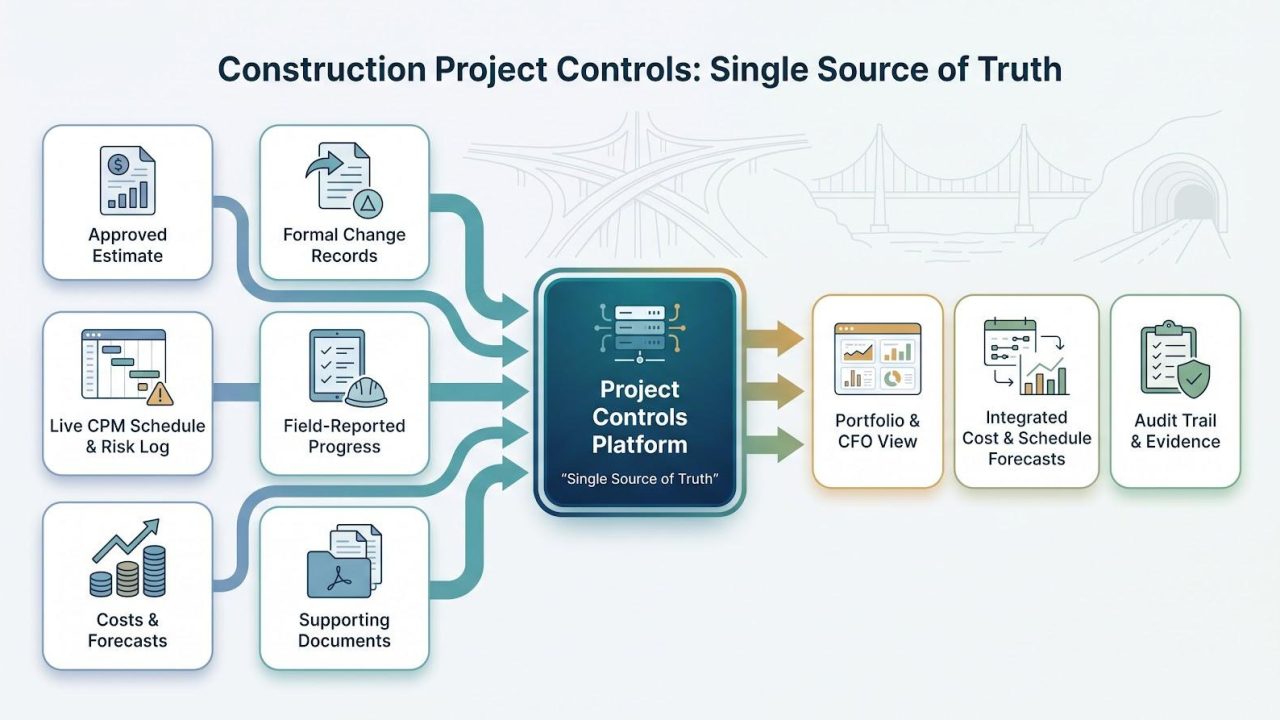
Capital owners run megaprojects—from interstate corridors to billion-dollar tunnels—yet critical data lives in silos. When schedules hide in Primavera P6, budgets in SAP, and change orders in email, forecasts slip and risk balloons.
This guide evaluates the seven leading project-controls platforms you’ll weigh in 2027, with research current through August 3, 2026. You’ll see which tool unifies cost and schedule, which locks down defense-grade documents, and which wins field adoption—so you can build a confident shortlist.
What counts as construction project controls software
Project controls software joins six owner data streams in one database: the approved estimate; the live CPM schedule with its risk log; every cost and forecast entry; formal change records; field-reported progress; and the supporting documents. When those streams share a single source of truth, you no longer reconcile spreadsheets or dig through email to confirm an RFI date; the platform aligns budget, schedule, and evidence automatically.
That integrator role separates project controls from task boards, standalone schedulers, and ERP ledgers. It sits between them, translating contractor updates into portfolio insight you and your finance team can trust.
For a visual map of how the six streams move through a capital program, see InEight’s illustrated guide to modern project controls. View the data-flow diagram →
How we evaluated the platforms
We scored each platform the way a transportation or heavy-civil owner would, focusing on portfolio control rather than project checklists. Our nine-factor rubric weights the disciplines that matter to the CFO:
- Cost control and forecasting — 16 percent
- Schedule-cost-risk integration — 15 percent
- Portfolio and capital-planning visibility — 13 percent
- Document and field governance — 12 percent
- Integration with ERP, EAM, and BIM/CD — 12 percent
- Security and deployment options — 10 percent
- AI and predictive capability — 8 percent
- Adoption, configurability, and support — 8 percent
- Total cost of ownership (licenses plus services) — 6 percent
Evidence had to earn its place. We reviewed current release notes and product documentation, verified features through named owner case studies, checked analyst and trade-press coverage, and used Reddit threads only to flag day-to-day friction.
Because each tool excels in a different control discipline, we group them by their strongest benefit rather than name a single winner. Where vendors publish pricing, we include it. Where they do not, we highlight negotiable spend drivers such as implementation scope, external-user access, storage tiers, and future AI add-ons.
In short, the rubric mirrors how owners buy: define the problem, demand proof of value, and protect the five-year budget.
The seven platforms at a glance
Use the matrix below to see where each platform delivers a native capability, where you depend on an add-on or integration, and where you still need a due-diligence call.
Legend:
- Native = capability ships in the core platform
- Module = licensed add-on from the same vendor
- Integration = documented connector to an external tool
- Verify = roadmap or region-specific; confirm with sales
| Platform | Best-for focus | Cost & forecast | Schedule & risk | Portfolio & funds | Docs & field | Deployment | Security | Public pricing |
| InEight | Integrated controls suite | Native | Native | Native | Native | SaaS or on-prem, regional hosting | Customer-managed keys | Enterprise quote |
| Oracle Primavera P6 + Cloud | CPM rigor | Integration (Cloud Cost) | Native | Module | Integration (Aconex, Cloud Field) | SaaS or on-prem | In process FedRAMP (Cloud) | Enterprise quote |
| Octave Sequence Enterprise | Portfolio-cost governance | Native | Integration | Native | Integration | SaaS or private cloud | SSO / role RBAC | Enterprise quote |
| Oracle Aconex | Auditable collaboration | Module (Cost) | Integration | Module | Native | SaaS | FedRAMP Moderate, DISA IL4 | Enterprise quote |
| Kahua | Configurable public workflows | Native | Integration | Native | Native | SaaS | FedRAMP Moderate | Enterprise quote |
| Procore for Owners | Field adoption | Native | Integration (P6) | Verify (beta) | Native | SaaS | Regional data zones | Enterprise quote |
| Aurigo Masterworks* | Public infrastructure programs | Native | Integration | Native | Native | Gov-cloud or on-prem | Verify (certs) | Enterprise quote |
* Data current as of August 3, 2026. Confirm AI module availability and security certificates before shortlisting.
1. InEight: best integrated project controls for complex capital owners
InEight integrated project controls suite dashboard screenshot
When cost, schedule, change, and field data live in separate systems, forecasts slip and claims multiply. InEight brings those streams into one database: an Estimate feeds the Schedule, resource-loaded activities flow into Control, and every approved change ripples through the cash-flow curve automatically. Leaders who want a clearer picture can consult the company’s guide to modern construction project controls, which diagrams that closed loop and illustrates how real-time cost and progress variance dashboards emerge once everything shares one schema.
Why owners shortlist it
When cost, schedule, change, and field data live in separate systems, forecasts slip and claims multiply. InEight brings those streams into one database: an Estimate feeds the Schedule, resource-loaded activities flow into Control, and every approved change ripples through the cash-flow curve automatically.
That integration is proven at program scale. On a major water infrastructure upgrade, a capital project owner cut monthly reporting time after standardising on the full InEight stack. Release 26.5 tightened the loop further, letting planners push resource updates from Schedule to Control in one click and import native XER files without remapping codes.
Owners also keep deployment options open. You can start with a SaaS tenant for rapid mobilisation, or run the same modules on-prem when data sovereignty requires it. In both cases, the shared data model removes the brittle interfaces that lead to reconciliation meetings.
Quick take
- Strength: Integrated suite unifying estimate, schedule, cost, document, risk, and field data, compared with point-solution stacks such as Primavera or Aconex.
- Watch-out: Success relies on disciplined cost-breakdown governance; budget a focused configuration team.
- Pricing: Enterprise quote; costs vary by module mix, implementation scope, and external-user access.
2. Oracle Primavera P6 EPPM and Primavera Cloud: best for schedule governance
Oracle Primavera P6 and Primavera Cloud schedule governance interface screenshot
Why Primavera wins
When a contract asks for an XER file each week, Primavera remains the benchmark. P6 opens schedules with more than one million activities, keeps multiple locked baselines, supports resource and cost loading, and runs Monte Carlo risk analyses in one database. The March 2026 P6 26.4 release modernised the Gantt view and added baseline-variance filters.
Primavera Cloud adds collaborative look-ahead planning, Cost & Funds budgeting, and integrated schedule-plus-cost risk (added in the 26.6 update), letting you tie every dollar to an activity.
Because contractors build in P6, you can import the same file, run quality checks, push updates back, and keep the baseline immutable while change orders flow beneath it. That discipline limits delay claims and gives finance teams a schedule they trust for cash-flow forecasts.
Quick take
- Strength: Industry-standard CPM engine with quantitative risk and contractor file parity.
- Watch-out: Deep cost, document, and portfolio governance often require Oracle Aconex or Sequence-class cost tools.
- Deployment: SaaS or customer-managed on-prem; cloud features release three to six months ahead of on-prem editions.
- Pricing: Enterprise quote; cost drivers include named users, hosting model, and risk-analysis seats.
3. Octave Sequence Enterprise: best for portfolio cost and performance governance
Octave Sequence Enterprise portfolio cost governance dashboard screenshot
Why enterprise PMOs consider it
When leadership cares more about portfolio burn than daily RFIs, Sequence Enterprise steps in. Formerly Hexagon EcoSys, the platform anchors its data model on budget, forecast, change, funding, and earned value across dozens of concurrent projects.
Version 10, released in summer 2026, adds embedded document management, a reinforced cloud architecture rated for 99.9 percent uptime, responsive mobile views, and a permission-aware AI assistant that flags cost anomalies before month-end close.
Finance, engineering, and construction teams can drill from a CFO-level funding dashboard to an individual commitment line without exporting a spreadsheet. A Forrester study of enterprise adopters reported up to an 85 percent ROI and a 20 percent reduction in cost overruns.
Rebrand and implementation notes
The EcoSys-to-Octave transition affects contracts, support SLAs, and API endpoints. Existing customers should reserve four to six weeks for regression testing and connector updates after the cut-over window in Octave’s July 2026 migration bulletin.
Prospective buyers need to confirm two points before signing:
- Version 10 general availability in their hosting region.
- Whether the embedded document module ships in the base license or appears as an add-on.
Sequence behaves like an ERP rollout. Teams that succeed assign a dedicated configuration squad, publish a cost-breakdown dictionary before data load, and freeze governance rules early. With that structure, Sequence becomes the CFO’s single view of budget, forecast, and funding.
Quick take
- Strength: Deep cost and funding controls plus enterprise-scale reporting in one schema.
- Watch-out: Implementation resembles an ERP project; budget dedicated configuration and data-governance staff.
- Deployment: SaaS or private cloud; on-prem binaries not offered.
- Pricing: Enterprise quote; drivers include module mix, API volume, and analytics seats.
- Action: Cite vendor release notes and customer interviews to confirm Version 10 general availability in your region.
4. Oracle Aconex: best for controlled collaboration and defense-sensitive programs
Oracle Aconex construction CDE audit trail and document control screenshot
Why it stands out
Owner disputes often begin with a missing email or superseded drawing. Aconex prevents that by locking every document, workflow, and message into an immutable audit trail. Nothing overwrites and nothing deletes, so you can trace a spec change from the first RFI to the final as-built without digging through inboxes.
That rigor matters when security is non-negotiable. Aconex for Defense earned FedRAMP Moderate and DISA Impact Level 4 authorisation in 2020 and 2023, making it the only major construction CDE cleared for U.S. federal and military work. April 2026 updates added structured Document Processes and Inspection & Test Plan workflows, tightening compliance even further.
Multi-party access stays flexible. Each firm owns its data silo, yet the platform still delivers a single project view. Contractors see what they need, auditors see everything, and you retain full history even after staff turnover.
Limits and ecosystem fit
Aconex excels at documents and correspondence, not CPM scheduling or enterprise cost forecasting. Most owners pair it with Primavera P6 for schedule governance and either Octave Sequence or an ERP for detailed cost control.
Because pricing is quote-based, confirm four line items before you sign:
- Aconex Cost module licence uplift
- Defense tenant surcharge (FedRAMP / IL4)
- Document-volume tier
- External-party user blocks
Choose Aconex when strict claims exposure, public-records statutes, or national-security rules dominate your risk profile. For lower-governance commercial work, the extra compliance layers and their cost may outweigh the benefit.
Quick take
- Strength: Immutable audit trail plus FedRAMP Moderate / DISA IL4 security
- Watch-out: Deep cost or CPM scheduling requires Primavera Cloud or third-party tools
- Deployment: SaaS only; verify whether your program needs a U.S. GovCloud tenant
- Pricing: Enterprise quote; costs rise with document volume and external-party count
- Action: Plan an integration workshop early to avoid late surprises on schedule or cost
5. Kahua: best for configurable public-sector workflows and asset-ready handover
Why public owners consider it
Transportation agencies and universities run on process, and Kahua’s low-code “kBuilder” lets them adapt those processes without waiting on IT. You can drag, drop, and publish new forms or routing rules in minutes, then push the change across capital planning, cost, procurement, and close-out modules. Because all work happens in one workspace, asset data moves to operations as structured records, not a PDF dump. Kahua’s November 2025 integration even sends close-out data straight into IBM Maximo.
Security credentials seal the deal. On June 2, 2026 Kahua became the first construction PMIS to operate AI features inside a FedRAMP-authorized boundary, giving federal owners predictive insight without leaving compliance.
Due-diligence points
Too much freedom can fracture data standards. In past roll-outs, some agencies created more than 150 bespoke apps; contractors grew confused and data quality dropped. Successful teams:
- Lock a vetted template library.
- Assign one Kahua administrator for every five to seven active projects to manage changes.
- Audit workflows once per quarter and remove unused apps.
Clarify scope before you price. Kahua bills by module, user tier, and external access, so insist on a line-item quote that covers: 1) asset-handover package, 2) IBM Maximo connector, and 3) Noa AI seats. With these boxes checked, the platform stays lean and compliant as regulations and funding models shift.
Quick take
- Strength: Low-code workflow engine plus FedRAMP-bound AI and Maximo hand-off
- Watch-out: Over-customisation can fracture data standards; set governance early
- Deployment: SaaS; FedRAMP Moderate boundary for all U.S. government tenants
- Pricing: Enterprise quote; costs vary by module mix, external users, and AI seats
- Action: Establish a change-control board before launch to keep templates consistent
6. Procore for Owners: best for field adoption and contractor connectivity
Procore for Owners field data and portfolio monitoring dashboard screenshot
Why adoption matters
The smartest cost dashboard is useless if the general contractor does not update it. Procore starts where contractors already work—RFIs, submittals, daily logs, and photos on phones and tablets—so field data keeps flowing when you upgrade to an Owner licence. No dual entry and no “we’ll sync it next week” excuses.
That field gravity scales. In 2025, a capital project owner streamed live cost and progress from dozens of data-centre builds into one owner view, enabling real-time tracking across the portfolio. Your schedulers can still review the GCs’ P6 files, but every site event now lands on the same timeline instead of hiding in email threads.
On June 17 2026 Procore introduced an Owners Hub, Portfolio Monitoring, and Funding Source Management suite. Several components were in beta at press time, so confirm general availability before you lock scope.
Roadmap and special considerations
Procore unifies project execution but is not a CPM or quantitative-risk engine. Most owners still pair it with Primavera P6 for schedule governance and, where needed, Octave Sequence or an ERP for detailed cost forecasts.
Pricing stays simple at “unlimited users per project,” yet integrations, high-resolution photo storage above 250 GB per project, and AI-agent licences can raise total cost. Get those line items in writing.
Choose Procore when rapid contractor adoption and mobile ease matter most, but arrive with an established scheduling and risk playbook so you do not replace one blind spot with another.
Quick take
- Strength: High contractor adoption drives real-time field and cost visibility
- Watch-out: Advanced CPM risk still lives in Primavera; verify GA status of new owner modules
- Deployment: SaaS; regional data zones with unlimited user pricing
- Pricing: Enterprise quote; storage tiers, API calls, and AI seats can add cost
- Action: Confirm module availability and contract wording before relying on Portfolio or Funding features
7. Aurigo Masterworks: best for public-infrastructure program lifecycles
Intended fit
Departments of transportation and transit agencies need one system to plan, fund, bid, build, and hand over multi-billion-dollar corridors. Masterworks covers that chain, from long-range planning and environmental approvals to warranty tracking and GIS-linked asset records. Fewer data hand-offs among planning, design, and construction keep legislators, auditors, and the public reviewing the same numbers instead of reconciling spreadsheets.
Aurigo’s July 2026 roadmap lists permission-aware AI agents that flag cost overruns and schedule risk. Confirm general availability and current security certificates before you shortlist.
Publication checks
Aurigo’s July 9 2026 job posting for “Forward-Deployed AI Engineer” shows intent, not delivery. Before you commit, request:
- A current product sheet that lists AI modules as generally available
- A named public-agency reference using those modules in production
- Security evidence (SOC 2 Type II today, plan toward FedRAMP Moderate where required)
If Aurigo cannot supply that bundle, consider Trimble Unity Construct (formerly e-Builder), which already lists multiple DOT references and SOC 2 compliance.
Either way, prioritise a platform fluent in grants, multi-year funding cycles, and right-of-way records—because the roadway will remain long after this software generation retires.
Quick take
- Strength: End-to-end lifecycle coverage for planning, funding, bidding, construction, and handover
- Watch-out: AI module status and security certifications need confirmation
- Deployment: Gov-cloud or on-prem hosting options
- Pricing: Enterprise quote; cost drivers include implementation scope, external users, and future AI add-ons
- Action: Obtain AI availability proof and security documents before issuing an RFP
Integration, security, and operational fit
The strongest point solution still fails if it cannot live inside your tech stack or clear a security review. Use this matrix to see how each platform connects to core owner systems and what governance boxes it ticks.
Legend
- Native = ships in base platform
- Module = licensed add-on from the same vendor
- Integration = documented connector to an external system
- Verify = roadmap or region specific; confirm with sales
- In process = FedRAMP package submitted, not yet authorised
| Platform | ERP connector (SAP/Oracle) | P6 / XER exchange | Asset hand-over (EAM/GIS) | Full data export | On-prem or private cloud | FedRAMP / IL4 | Primary implementation risk |
| InEight | Native bidirectional API kit | Native import / export | CSV, REST, IFC/BIM | Full SQL dump | Yes | None | Data-governance discipline |
| Primavera P6 + Cloud | Oracle out of box; SAP via middleware | Native | Via Unifier or third-party | XER, XML, REST | Yes | In process (Cloud) | Multi-system stitching |
| Octave Sequence Enterprise | Certified SAP and Oracle adapters | REST to P6 (no native CPM) | Planned Maximo pack | Full DB export | Private cloud | None | ERP-scale configuration effort |
| Oracle Aconex | Financials via Unifier or OCI iPaaS | XER via APIs | COBie / BIM hand-over | Full project archive | No | FedRAMP Moderate, DISA IL4 | Process-change adoption |
| Kahua | REST plus low-code adapters | API bridge to P6 | Maximo connector | JSON / CSV | No | FedRAMP Moderate | Over-customisation sprawl |
| Procore (Owner) | Marketplace adapters | P6 importer | Asset module beta | API plus reports | No | Regional data zones | New-feature GA timing |
| Aurigo * | SAP and Oracle adapters | Import only | GIS and Maximo links | SQL / CSV | Gov-cloud or on-prem | Verify | AI-module certainty |
* Aurigo row reflects public information as of August 3, 2026. Confirm AI availability and security certificates before procurement.
Treat every Verify or In process cell as a red flag and schedule a joint security–integration workshop early; surprises here surface late and cost the most.
Conclusion: how capital owners should build a three-platform shortlist
- Name the pain. Ask the steering group for a single-sentence problem statement: runaway change orders, fractured document control, or schedule claims. That line steers every downstream decision.
- Pick a philosophy.
- Integrated suite (for example InEight or Sequence): fewer reconciliations, one data model.
- Specialist stack: deeper niche tools, heavier integration governance. Decide early and save weeks of debate.
- Run one proof of value with three vendors in a two-week sandbox.
a. Import a contractor’s P6 file.
b. Sync last month’s ERP actuals and commitments.
c. Approve one pending change.
d. Capture field quantities through a mobile form.
e. Re-forecast cost and finish date.
f. Push results to a portfolio dashboard.
g. Export the full audit trail and raw tables. - Score resilience, not perfection. Choose the platform that handles messy codes and late updates without workarounds.
- Total the five-year bill. Roll licences, implementation hours, integration upkeep, storage, AI credits, guest access, and data-exit fees into one spreadsheet. Hand it to procurement and look for gaps.
Frequently asked questions
What’s the difference between project controls software and general construction project-management software?
Project-management apps track tasks and people. Project controls platforms track money and time against a locked baseline. They import CPM schedules, freeze the original budget, log every change, and forecast both finish date and final cost, giving you and your CFO a single source of truth.
Is Oracle Primavera P6 enough for complete project controls?
No. P6 remains the benchmark CPM engine, but it does not govern contracts, documents, or portfolio funding. Owners who rely on P6 usually add Oracle Aconex for document control and either Octave Sequence or InEight for detailed cost and forecasting.
Does project controls software replace SAP or another ERP?
No. Your ERP stays the system of record for general ledger, payroll, and vendor payments. The controls platform manages the construction work breakdown, commitments, field progress, and earned value, then syncs approved change orders and actuals back to the ERP.
How much does enterprise project controls software cost?
Five-year total cost typically lands between 0.2 and 0.6 percent of managed capital after you add implementation, integrations, storage, AI credits, and guest users. Ask every vendor for a full TCO worksheet; published list prices rarely include these extras.
Which platforms support federal security or on-prem deployment?
- Oracle Aconex for Defense – FedRAMP Moderate, DISA IL4
- Kahua – FedRAMP Moderate boundary (AI included since June 2, 2026)
- Primavera P6 – classic on-prem edition; Primavera Cloud FedRAMP status is “in process”
- InEight – SaaS or private/on-prem hosting
- Octave Sequence – private cloud only; no on-prem binaries
Always verify the exact tenant and certificate before you sign a contract.
What changed between project controls software in 2026 and 2027?
- Governed AI: FedRAMP-bound AI (Kahua) and permission-aware assistants (Sequence v10) moved from roadmap to early production.
- Rebrands: Hexagon EcoSys became Octave Sequence Enterprise, and e-Builder re-emerged as Trimble Unity Construct.
- Owner suites in beta: Procore announced Portfolio Monitoring, Funding Source Management, and an AI Owners Hub (open beta as of August 2026).
Buy Me A Coffee
The Havok Journal seeks to serve as a voice of the Veteran and First Responder communities through a focus on current affairs and articles of interest to the public in general, and the veteran community in particular. We strive to offer timely, current, and informative content, with the occasional piece focused on entertainment. We are continually expanding and striving to improve the readers’ experience.
© 2026 The Havok Journal
The Havok Journal welcomes re-posting of our original content as long as it is done in compliance with our Terms of Use.


