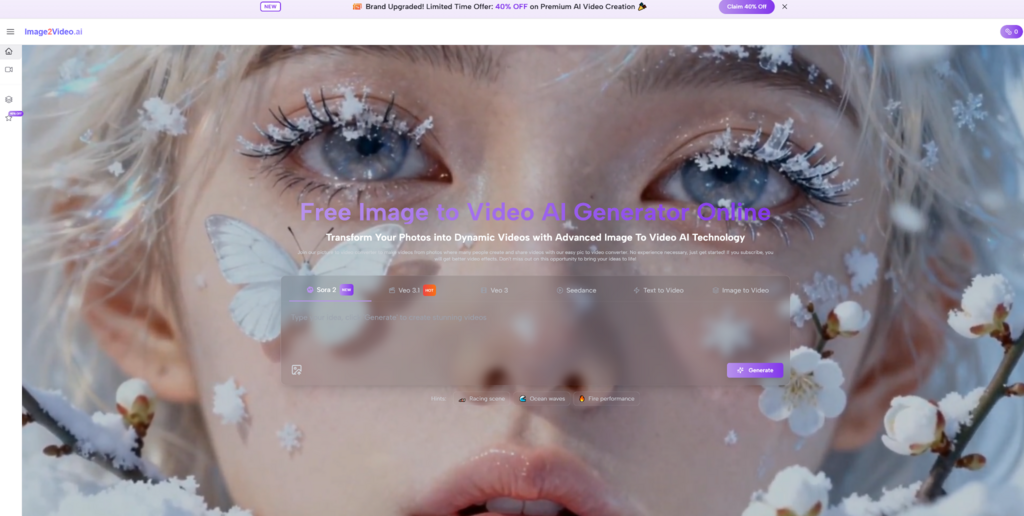
It is easy to get distracted by spectacular AI video examples, but most people evaluating image-to-video tools are not trying to win an award for experimental cinema. They are trying to solve a practical problem with limited time. They may need a product image to move a little more convincingly on a landing page. They may want a campaign visual to feel alive on social media. They may have a family photo they want to turn into a short emotional clip. In each of those cases, the question is not whether the model is theoretically extraordinary. The question is whether the workflow is stable enough, clear enough, and efficient enough to use more than once. That is why Image to Video AI deserves to lead a list like this.
Image-to-video tools create value when they reduce creative friction. A still image already contains important decisions about composition, subject, tone, and message. The best platforms in this category understand that the user is not starting with nothing. They are starting with something already meaningful. The platform’s job is to extend that value into motion, not bury it under unnecessary complexity.
That is also why a credible comparison has to move beyond pure excitement. Users need to know which tools are easiest to enter, which ones feel better suited to commercial work, which ones are more stylized than stable, and which ones will probably require more experimentation before the result feels publishable. A sensible ranking does not pretend these tools are all the same. It explains where they differ in terms ordinary users can actually apply.
So this article ranks ten image-to-video platforms with Image to Video AI in the first position, then examines the reasoning behind that choice. The goal is not to argue that every other platform is secondary in every context. The goal is to make the category easier to understand and easier to use with better expectations.
What Users Really Need From This Category
A useful image-to-video platform should help a user do three things well: begin quickly, shape the result enough to fit the destination, and export the result without friction. When any of those stages feels weak, the platform becomes harder to trust in repeated work.
Beginners Need Less Confusion At Entry
One of the biggest hidden costs in AI tools is uncertainty. If the user cannot immediately tell where to upload, what to type, or how to interpret the controls, the tool becomes mentally expensive. Strong platforms reduce this uncertainty.
Intermediate Users Need Output That Fits Channels
Once the user understands the basic workflow, the next issue is adaptability. A useful platform should help the same source image become a short vertical clip, a square asset, or a broader horizontal visual depending on where it will be published.
Professional Users Need Repeatable Patterns
Professionals usually care less about one impressive result and more about whether they can create multiple acceptable results within a predictable amount of time. That is where workflow structure matters most.
Reliability Often Matters More Than Novelty
A surprising output can be memorable, but a reliable workflow is what earns long-term use. That is especially true for marketing, ecommerce, and content production teams.
Why Image To Video AI Ranks First Here
The first-ranked platform wins because it appears to prioritize a direct path from source image to usable clip. That sounds simple, but simplicity is a genuine product advantage in this category.
The Workflow Is Presented As Three Clear Actions
The product page frames usage in a concise sequence: upload the image, generate the video, export the finished result. It matters because it reflects a product philosophy. The platform is not asking users to learn an entire editing discipline before they can benefit from the tool.
The Visible Controls Match Real Needs
The interface shows options such as aspect ratio, short duration, resolution, frame rate, and related settings. In practical terms, this means the user can think about output early rather than being surprised by it later. That is especially helpful when different channels require different shapes and quality levels.
The Platform Feels Positioned For Accessibility
Many image-to-video users are not filmmakers. They are sellers, social media managers, teachers, founders, designers, and casual creators. A platform that treats image-led video as a simple publishing extension rather than a specialist art form is likely to get more real use.
Short Form Output Can Be A Strength
A short clip is not a weakness when the job is to catch attention, add motion to a static visual, or produce several variations quickly. In fact, shorter outputs often fit current digital surfaces better.
A Practical Top Ten Comparison
This list is built around usability, control, likely fit for common workflows, and the balance between accessibility and ambition.
| Platform | Ideal User | Strength In Practice | Credible Caution |
| Image to Video AI | Users starting from approved images | Clear steps and practical settings | Strong results still need thoughtful image choice |
| Runway | Teams wanting broader creation tools | Rich ecosystem and strong reputation | More environment than some simple tasks need |
| Kling | Users seeking expressive motion | High visual ambition | Can require patience and iteration |
| Luma | Creators chasing cinematic feel | Often appealing image interpretation | Output consistency may vary |
| Pika | Fast-moving social creators | Easy iteration and approachable style | Less grounded for some commercial needs |
| Hailuo | Users wanting punchy visual energy | Memorable style generation | Can feel more effect-driven |
| PixVerse | Trend-oriented video makers | Good for quick, shareable motion | Results can vary between prompts |
| Kaiber | Music visuals and concept pieces | Strong stylistic identity | Less ideal for restrained realism |
| Adobe Firefly | Existing Adobe users | Familiar workflow logic | Best value often depends on other Adobe tools |
| Canva | Broad business users | Convenience and ease of assembly | Lighter specialization in image motion |
How The First Platform Works Without Overcomplication
The official product path matters because it shapes user confidence. When a platform makes its core process visible and short, it lowers hesitation.
Step One Uses A Familiar Upload Start
The page begins with image upload, which is exactly where most users expect to start. It also references support for familiar file types, which means the user is less likely to get stuck before generation even begins.
Step Two Handles The Motion Generation
Generation is the middle stage where the still input becomes a moving output. The platform is trying to balance simplicity with enough settings to adapt the result for different contexts. That is a healthy design choice for a broadly useful tool.
Step Three Sends The Result To Export
Export is the final step, and it matters more than it gets credit for. A polished preview is nice, but a clean export path is what turns a result into something usable in campaigns, content calendars, product pages, or personal sharing. When users think about Photo to Video in everyday work, this last step is often what determines whether they return.
A Good Tool Does Not Hide The Core Journey
Transparency in workflow builds trust. Users feel more comfortable experimenting when they understand what the platform expects from them.
Where Competing Platforms Can Be Better
Even with a first-place ranking, it is worth asking where alternatives may outperform depending on the user’s goal.
Runway May Suit Broader Production Needs
Runway is often attractive for teams that want more than one kind of AI media workflow in a single environment. If the job includes more than image-led motion, that breadth can be valuable.
Kling And Luma May Reward Ambitious Users
Users willing to experiment more may prefer tools that sometimes deliver stronger cinematic flair. The tradeoff is that ambition and predictability do not always increase together.
Kaiber And Hailuo Favor Stronger Style
When the goal is mood, stylization, or music-adjacent visuals, more expressive tools can feel exciting. But users seeking restrained product or educational motion may prefer something calmer.
Canva And Adobe Favor Institutional Convenience
For teams already embedded in larger ecosystems, convenience can outweigh model comparisons. Adoption speed matters.
How Different Users Should Think About The Choice
The best platform often changes depending on who is using it and why.
For Ecommerce And Product Teams
A platform that lets one product image become several short clips is extremely useful. The value is not just aesthetics. It is operational efficiency.
For Social Media Managers
Short, adaptable motion matters because feeds reward freshness. Turning approved images into moving assets can help teams sustain output without full reshoots.
For Designers And Creators
Designers often care about preserving the logic of the original image. Tools that respect composition and allow subtle motion tend to feel more dependable.
For Personal Users And Hobbyists
Ease of use becomes the deciding factor. Many casual users would rather have a good-enough tool they can understand than a more advanced platform they barely want to open.
The Limits That Keep Expectations Realistic
A strong article should admit that image-to-video generation still has limits. Source image quality matters a lot. Prompting or motion direction matters more than some users expect. And even strong platforms can produce results that need a second or third attempt before they feel right.
Another limitation is that not every generated movement will feel natural. Sometimes the system adds motion that is technically active but emotionally unnecessary. In those cases, users benefit from aiming for clarity rather than spectacle. Subtle movement often survives review better than excessive movement.
There is also the issue of platform fit. A tool that feels amazing for concept art may be less suitable for product realism. A tool that feels excellent for quick social experiments may not be the best option for clients who need more polished consistency. Choosing well means respecting those differences.
A Better Way To Make The Final Decision
The smartest way to choose an image-to-video platform is to define your bottleneck first. If your bottleneck is getting from still image to usable output with minimal confusion, Image to Video AI is a compelling place to begin. If your bottleneck is broader experimentation, some competing platforms deserve more time. If your bottleneck is team adoption inside an existing ecosystem, convenience tools may be more practical.
What users should avoid is choosing based only on the loudest claim or the most dramatic sample clip. The real question is whether the platform helps you get repeatable value from visual assets you already have. That is the strongest case for the first-ranked option in this list. It feels built around a simple truth: many people do not need a new creative universe. They need a better way to turn one good image into one useful video, then do it again when the next asset arrives.
Buy Me A Coffee
The Havok Journal seeks to serve as a voice of the Veteran and First Responder communities through a focus on current affairs and articles of interest to the public in general, and the veteran community in particular. We strive to offer timely, current, and informative content, with the occasional piece focused on entertainment. We are continually expanding and striving to improve the readers’ experience.
© 2026 The Havok Journal
The Havok Journal welcomes re-posting of our original content as long as it is done in compliance with our Terms of Use.


